Follow any Space or Community, from anywhere.
Follow Spaces &
Communities by ADC
LumApps only lets people follow a Space or Community from inside it. This widget puts a “Follow [Space / Community name]” button on any page, including the homepage, so employees can follow the social content that matters to them wherever they find it.
- Following Q&A Support
- Follow All About Spaces
- Follow Leadership Corner
OUR WIDGET
Why
use it
- 01
Follow from any page
Get past the native limit of following a Space or Community only from inside it, and put the follow button anywhere on your site.
- 02
Always shows the right state
Each button reflects whether the employee already follows the Space or Community, so nobody clicks twice.
- 03
Make it easy to opt in
Let employees join the conversations relevant to them right away, without sending them off to find the follow button.
HAVE A LOOK AT
What it does
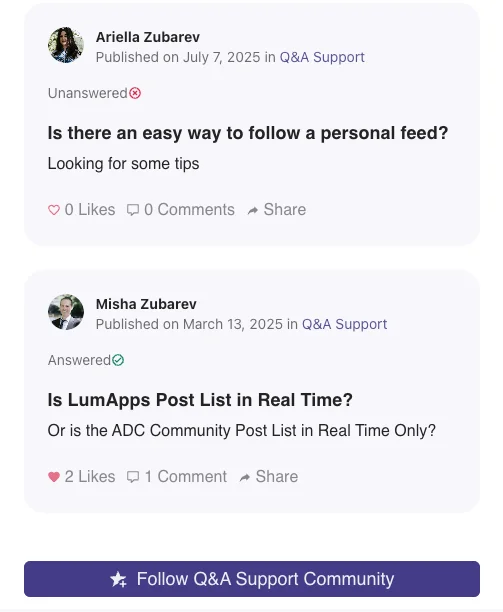
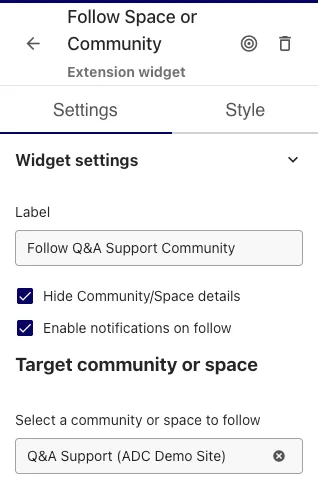
One Button per Space.
Each button is tied to a specific LumApps Space or Community.
Follow in Real Time.
Clicking follows or unfollows instantly, and the button updates to match.
Multiple Buttons per Page.
Position as many buttons as you like anywhere within the same page layout.
Styled by LumApps Designer.
A responsive design built with LumApps Designer best practices, styled to match your site theme.
HOW IT WORKS
Set up in three steps
- STEP 1
Add the widget
Place the Follow Space or Community widget on any page, including the homepage.
- STEP 2
Pick the target
Choose the Space or Community to follow and add a custom label, such as “Follow Q&A Support Community”.
- STEP 3
Employees follow
One click follows or unfollows in real time, and the button shows the current state.
All pricing includes
- Unlimited usage (no user limit)
- Extension initiation, setup and training
- ADC Extension Maintenance & Support
- Also available in the Follow Actions Bundle
Contact ADC for a no-commitment trial.
Start a Free TrialWHY DO YOU NEED THIS
Who it benefits
Added value for your page administrators, your employees, and the communities they join
Administrators & Experience Managers
Promote any Space or Community from the homepage or a landing page, with buttons you position and style like any other widget.
Employees
Opt in to the Spaces and Communities that matter to them in one click, with a button that always shows whether they already follow.
Community Managers
Grow your membership by inviting employees to follow right where they read about your Space or Community.
GO FURTHER